






Learn how to blacklist unwanted domains or emails


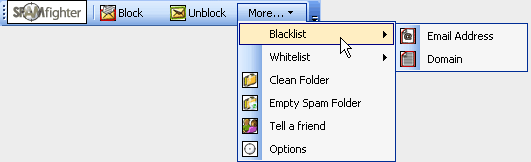
If you receive unwanted mail on a regular basis from a specific address, you can permanently Blacklist the sender. To do this, highlight the unwanted email, go to: "More" -> "Blacklist", and select "Email Address". From now on, you will not receive any further mail from this address.
With SPAMfighter, you can also block incoming mails from specific domains. If you receive many unwanted mails from the same domain and you want to find a way to stop all emails from domains you do not like, highlight the email and go to: "More" -> "Blacklist", and select "Domain". After having done this, you can lean back and enjoy the silence.


 | Back |  | Next |  |