Allow Active Scripts
我已經購買了SPAMfighter,但為何我試圖登入社區時沒有任何反應,並且不能輸入我的產品序列號?
這可能是因為您在某些情況下出於安全原因停用了動態腳本。
請打開您的瀏覽器
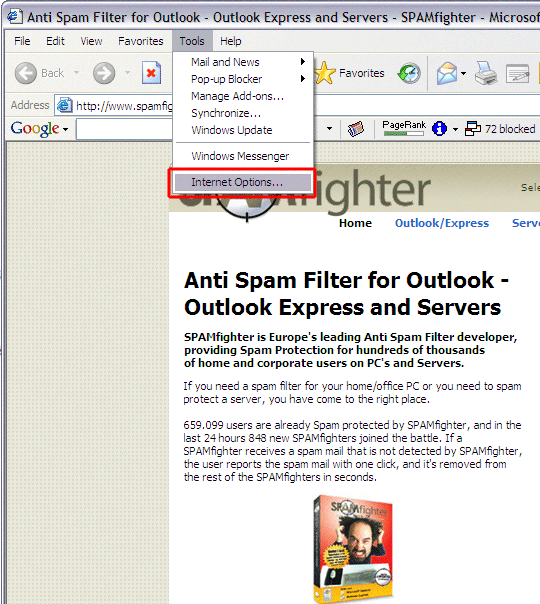
選擇"工具"->Internet 選項"。
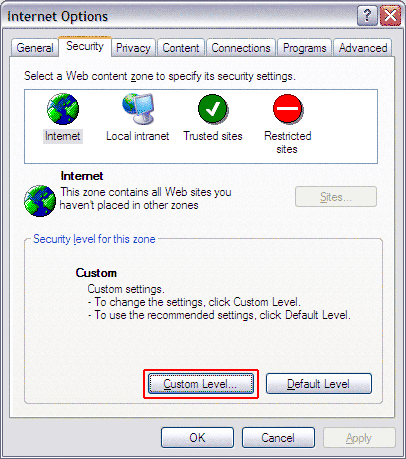
選擇介面 -> "安全性"並點選 -> "自定義級別"。
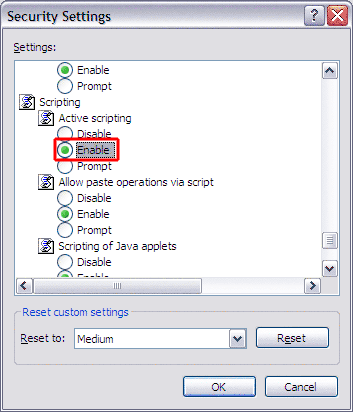
向下滾動到"腳本編寫" ->"動態腳本編寫"。
選擇"啟用"。
點選兩次"確定"
您的設置現在應該正確了。


Allow Active Scripts
我已經購買了SPAMfighter,但為何我試圖登入社區時沒有任何反應,並且不能輸入我的產品序列號?
這可能是因為您在某些情況下出於安全原因停用了動態腳本。
請打開您的瀏覽器
選擇"工具"->Internet 選項"。
選擇介面 -> "安全性"並點選 -> "自定義級別"。
向下滾動到"腳本編寫" ->"動態腳本編寫"。
選擇"啟用"。
點選兩次"確定"
您的設置現在應該正確了。


SPAMfighter 兼容於
和
Windows 7,
Windows Vista,
Windows XP
我們也是