






Clean your inbox for spam and empty your spam folder


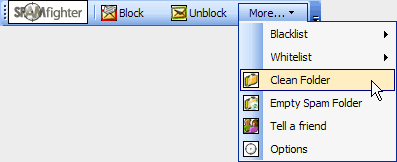
When you run SPAMfighter for the first time, it would be a good idea to clean your Inbox for previous received spam. You can do this by clicking "More" -> "Clean Folder". Choose which folder to clean, and SPAMfighter will search and filter all your spam mails into the SPAMfighter folder.
If you wish to delete all the spam mails in your SPAMfighter folder then simply click on "More" -> Empty spam folder".
Notice! If you are using "Cached Exchange Mode" you need to empty your "Deleted Items" (folder) before complete removal of your spam mails.


 | Back |  | Next |  |