






Learn how to Whitelist emails


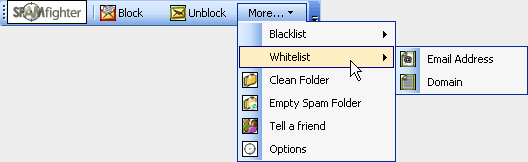
We all have different tastes. This naturally means that something you find interesting might be considered SPAM by others and thereby reported to our SPAMfighter server. You can Whitelist specific addresses quickly and easily, thereby making sure that you always receive these emails - no matter what others think of the content.
Find the email and highlight it. In the SPAMfighter toolbar, go to: "More" -> "Whitelist" -> "Email Address". From now on, the mail will not be filtered outby SPAMfighter. You can also Whitelist everything coming from a specific domain name. Just Whitelist the Domain instead of a specific email address.


 | Back |  | Next |  |