

SPAMfighter has built the best and most effective anti spam filtering service for Thunderbird.. If you prefer to use Thunderbird then SPAMfighter is your companion when fighting spam. For home users it is 100% free.
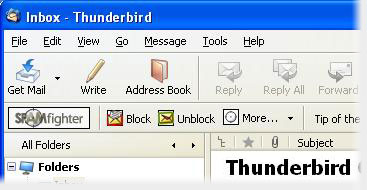
Whenever new mail arrives, it will automatically be tested by SPAMfighter. If it is spam, it will be moved to your spam folder. If you receive a spam mail that is not detected, click on the Spam Blocker button, and the spam mail is removed from the rest of the 8,968,667 SPAMfighters in 238 countries/areas in seconds.
SPAMfighter Standard
This is the product you download and get free for 1 month. After the trial, you can choose to pay only US$29.00 and keep the Pro version, otherwise you are automatically downgraded to the free SPAMfighter Standard. SPAMfighter Pro can be used in companies and other commercial environments and gives access to better protection, read more here.
SPAMfighter PRO
This is a free product and can only be used in homes and schools. In SPAMfighter Standard, a short text ad is displayed in your e-mail client, and an "I'm protected by SPAMfighter" message is attached as a footer to your outgoing e-mails. Also, you don't have the language filter and other useful features are missing.
Operating System
Microsoft Windows XP (SP2), Windows Vista, Windows 7, Windows 8/8.1 & Windows 10 (32bit and 64bit)
Email client
Mozilla Thunderbird